---
title: Comment modifier le statut d'une commande ?
description: Si vous souhaitez changer le statut d'une commande, il vous suffit de vous rendre sur une fiche commande (cf l'article Liste des commandes). 🚧 Si vous souhaitez rembourser une commande, il faudra ég
---
[Passer au contenu](https://aide.airweb.fr/migration/comment-modifier-le-statut-dune-commande#main-content)
Français
Afficher le sous-menu pour les traductions
[Portail client](https://info.airweb.fr/tickets?hsLang=fr)
![logo\_airweb\_blanc\_2020.png\]](https://aide.airweb.fr/hs-fs/hubfs/logo_airweb_blanc_2020.png?height=40&name=logo_airweb_blanc_2020.png)
Ouvrir la navigation principale
Fermer la navigation principale
- Français
Afficher le sous-menu pour les traductions
- [Portail client](https://info.airweb.fr/tickets)
Bonjour. Comment pouvons-nous vous aider ?
- Il n'y a aucune suggestion car le champ de recherche est vide.
1. [Aide et support](https://aide.airweb.fr/migration?hsLang=fr)
2. [Back-office](https://aide.airweb.fr/migration/back-office?hsLang=fr)
3. [Back-office airwebPASS](https://aide.airweb.fr/migration/back-office?hsLang=fr#back-office-airwebpass)
# Comment modifier le statut d'une commande ?
Si vous souhaitez changer le statut d'une commande, il vous suffit de vous rendre sur une fiche commande (cf l'article [Liste des commandes)](https://aide.airweb.fr/liste-des-commandes?hsLang=fr).
- Cliquer ensuite en haut à droite sur le bandeau comprenant le statut de la commande.
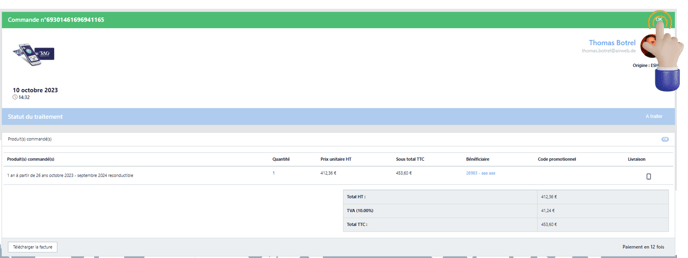
- Un menu déroulant s'ouvre et vous n'avez qu'à sélectionner le statut souhaité parmi ceux disponibles.
🚧 Si vous souhaitez rembourser une commande, il faudra également effectuer le [remboursement sur le back office Payzen](https://aide.airweb.fr/comment-rembourser-une-commande-sur-payzen?hsLang=fr) et supprimer le(s) titre(s) associé(s) à la commande.
- [Demande d'aide](https://aide.airweb.fr/migration/demande-daide?hsLang=fr#main-content)
- [Support airweb](https://aide.airweb.fr/migration/demande-daide?hsLang=fr#support-airweb)
- [Nouveautés](https://aide.airweb.fr/migration/demande-daide?hsLang=fr#nouveaut%C3%A9s)
- [Back-office](https://aide.airweb.fr/migration/back-office?hsLang=fr#main-content)
- [Back-office airwebPASS](https://aide.airweb.fr/migration/back-office?hsLang=fr#back-office-airwebpass)
- [Back office IV SCOOP](https://aide.airweb.fr/migration/back-office?hsLang=fr#back-office-iv-scoop)
- [Back office Payzen](https://aide.airweb.fr/migration/back-office?hsLang=fr#back-office-payzen)
- [Applications mobiles](https://aide.airweb.fr/migration/applications-mobiles?hsLang=fr#main-content)
- [Application mobile m-Ticket](https://aide.airweb.fr/migration/applications-mobiles?hsLang=fr#application-mobile-m-ticket)
- [Application tixiPASS](https://aide.airweb.fr/migration/applications-mobiles?hsLang=fr#application-tixipass)
# OMEA ID
[mailto:email@email.com](mailto:email@email.com)
Copyright © 2026, OMEA ID